For cars & trucks
A vehicle maintenance log that tells you what's due next.
Keep the service history for every car and truck online, log work from your phone, and get a reminder before the next oil change, tire rotation, or registration renewal.
Free for 2 vehicles. Unlimited on Pro Garage for $4/mo.
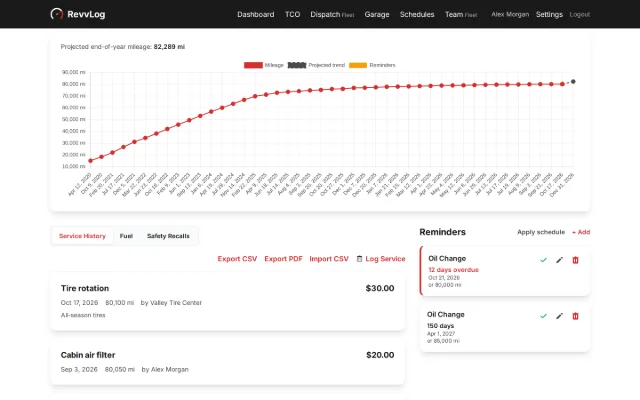
Real RevvLog screens with sample data.
Service history tracking without the shoebox
Everything a glovebox folder holds, searchable and on your phone.

Every service in one history
Log the date, mileage, work performed, parts, cost, and the shop that did it. Attach the receipt or invoice, and tag each entry so you can see what the car costs by category.

Reminders by date or mileage
Set an oil change for every 5,000 miles or once a year, whichever comes first. RevvLog emails you before it's due, and a private calendar feed puts due dates in your phone's calendar.

Scan the receipt, skip the typing
Photograph a shop invoice with your phone and RevvLog fills in the date, mileage, cost, and work performed. Install it to your home screen and the camera is one tap away.

Add a car by VIN, see open recalls
Enter the VIN and the year, make, and model fill in for you. RevvLog checks NHTSA for open safety recalls and shows them on the vehicle page, where you can mark each one fixed.
Registration and insurance expiry
Record registration, insurance, and inspection dates with plate or policy numbers and a scanned copy. Reminder emails start 30 days before anything expires.

Fuel economy and running costs
Log fill-ups or charging to track MPG or mi/kWh, in imperial or metric units, alongside what you spend on maintenance and repairs.
A maintenance schedule to start from
Pro Garage includes built-in schedules for common vehicles. Apply one and RevvLog creates the repeating reminders, then adjust any interval to match your owner's manual.
Passenger car (gasoline)
- Oil change every 5,000 miles or yearly
- Tire rotation every 6,000 miles
- Brake inspection every 12,000 miles or yearly
- Engine air filter every 15,000 miles or 2 years
- Coolant flush every 60,000 miles or 5 years
Electric vehicle
- Tire rotation every 7,500 miles
- Brake inspection every 12,000 miles or yearly
- Cabin air filter yearly
- Brake fluid flush every 2 years
- Battery coolant check every 4 years
Diesel pickup or van
- Oil and filter every 7,500 miles or yearly
- Tire rotation every 7,500 miles
- Fuel filter every 15,000 miles or yearly
- Transmission fluid every 60,000 miles
- Coolant flush every 100,000 miles or 5 years
General guidance, not manufacturer specifications.
A service record that helps you sell
A car with documented maintenance is easier to sell. On Pro Garage, send a buyer a read-only link to the service history, with costs and notes hidden unless you choose to show them, and they can download it as a PDF. When the sale goes through, transfer the vehicle and its records to the new owner.
Frequently asked questions
Is RevvLog's vehicle maintenance log free?
Yes, for 2 vehicles. The free plan includes unlimited service logs, receipt scanning, email reminders, recall checks, registration and insurance expiry, and CSV or PDF export. Pro Garage is $4/month or $40/year for unlimited vehicles, built-in maintenance schedules, cost-of-ownership dashboards, and shareable service history.
What should I record for each service?
The date, the odometer reading, the work performed, the parts used, the cost, and who did the work. Attach the receipt as well. That's what a buyer or a warranty claim will ask for, and the mileage is what RevvLog uses to work out when the next service is due.
Can I bring in the records I already have?
Yes. Import service history from a spreadsheet with CSV import, or photograph old receipts and let receipt scanning fill in each entry. Add the vehicle by VIN first and the year, make, and model fill in for you.
How do I show a buyer the car's service history?
On Pro Garage, create a buyer share link from the vehicle page. The buyer sees a read-only page with the service history, recalls marked fixed, and the current mileage, and can download it as a PDF. Costs, notes, and the VIN stay hidden unless you choose to show them, and you can revoke the link at any time. Once it's sold, you can transfer the vehicle and its records to the new owner's RevvLog account on any plan.
Is there a phone app?
Yes. RevvLog installs from the browser: Add to Home Screen in Safari on iPhone, or Install app in Chrome on Android. It needs a connection to save an entry, since there's no offline logging yet, and reminders arrive by email and through the calendar feed rather than as push notifications.
Does it work for electric cars and metric units?
Yes. Track efficiency in MPG, mi/kWh, km/L, or km/kWh, and Pro Garage includes a maintenance schedule for electric vehicles that covers tires, brakes, cabin filter, and battery coolant.
Can I get my data out?
Yes, on every plan. Export any vehicle's full service history to CSV or PDF whenever you like. You can delete your account from Settings, which removes your records and uploaded files.
RevvLog for the rest of your vehicles
Tractors & equipment
Service by the hour meter, with a log that replaces the paper in the barn.
Learn moreSmall fleets
Shared records for your team, recall rollups, and pricing per vehicle.
Learn moreOne account covers cars, trucks, and equipment. Compare plans and pricing.
Start your car's maintenance log today
Add your first vehicle in a couple of minutes. No credit card required.
Create Your Free Account